Java String vs StringBuilder: Complete Tutorial with Examples
- Career Amend
- Apr 23
- 6 min read

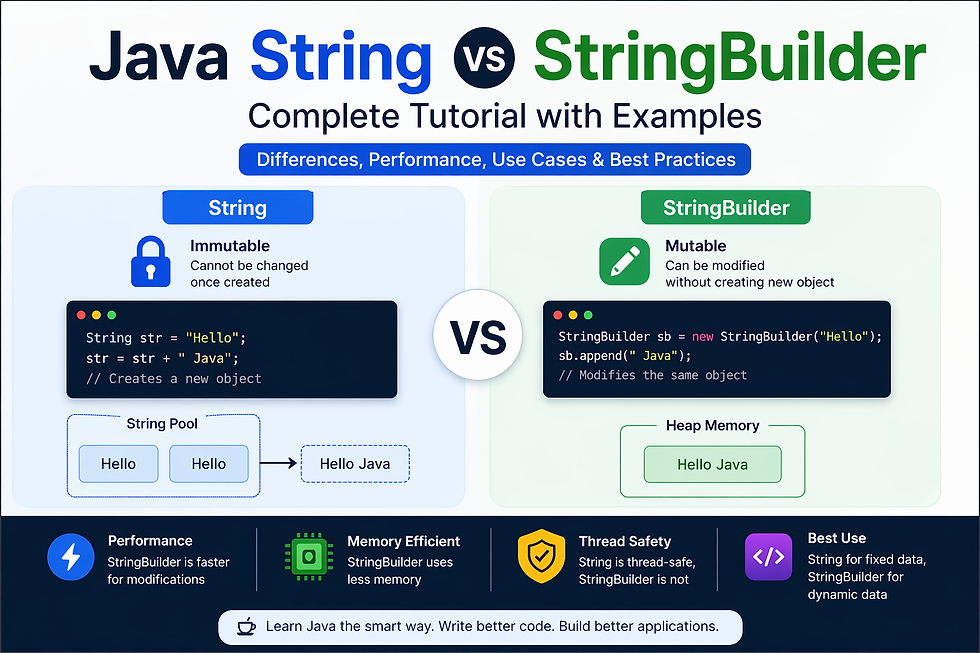
In Java programming, handling text data is one of the most common tasks developers perform. Whether you're building a web application, processing user input, or working with APIs, strings are everywhere. Java provides multiple ways to work with strings, but two of the most widely used are String and StringBuilder.
Understanding the difference between Java String vs StringBuilder is essential for writing efficient and optimized code. While both are used to store and manipulate sequences of characters, they behave very differently in terms of performance, memory usage, and mutability.
This tutorial will guide you through everything you need to know—from basic concepts to real-world examples—so you can confidently decide when to use String and when to use StringBuilder.
What is a String in Java?
A String in Java is an object that represents a sequence of characters. It is one of the most commonly used classes in Java and belongs to the java.lang package.
Key Characteristics of String:
Immutable (cannot be changed once created)
Stored in the String Pool (for memory optimization)
Supports various built-in methods like length(), substring(), and concat()
Example:
String name = "Java";
name.concat(" Programming");
System.out.println(name);
Output:
Java
Even though we used concat(), the original string remains unchanged. This is because Strings are immutable.
Why Java Uses Immutable Strings:
Security (used in class loading, file paths, etc.)
Thread safety
Efficient memory usage through string pooling
What is StringBuilder in Java?
StringBuilder is a class used to create mutable (changeable) strings in Java. Unlike String, it allows modifications without creating new objects.
Key Features:
Mutable (can be modified)
Faster than String for concatenation
Not thread-safe (but more efficient)
Example:
StringBuilder sb = new StringBuilder("Java");
sb.append(" Programming");
System.out.println(sb);
Output:
Java Programming
Here, the original object is modified instead of creating a new one.
Read More: What is StringBuilder in Java?
Key Differences Between String and StringBuilder
Understanding the difference between Java String vs StringBuilder is crucial for writing optimized programs.
Feature | String | StringBuilder |
Mutability | Immutable | Mutable |
Performance | Slower (new object) | Faster (same object) |
Thread Safety | Yes | No |
Memory Usage | More | Less |
Use Case | Fixed text | Dynamic text |
Summary:
Use String for fixed data
Use StringBuilder for frequently changing data
Mutability vs Immutability Explained
One of the biggest differences between String and StringBuilder is mutability.
Immutable (String):
Once a String object is created, it cannot be changed. Any modification creates a new object.
String str = "Hello";
str = str + " World";
Here, a new object "Hello World" is created.
Mutable (StringBuilder):
StringBuilder allows modification without creating new objects.
StringBuilder sb = new StringBuilder("Hello");
sb.append(" World");
The same object is updated.
Why This Matters:
Immutable objects are safer but slower
Mutable objects are faster but need careful handling
Performance Comparison: String vs StringBuilder
Performance is a major factor when choosing between String and StringBuilder.
String Performance:
Each modification creates a new object.
String str = "";
for(int i = 0; i < 1000; i++) {
str += i;
}
This results in:
Multiple object creations
Increased memory usage
Slower execution
StringBuilder Performance:
StringBuilder sb = new StringBuilder();
for(int i = 0; i < 1000; i++) {
sb.append(i);
}
This is:
Faster
Memory-efficient
Recommended for loops and dynamic operations
Conclusion:
StringBuilder is significantly faster for repeated operations.
Memory Management in Java Strings
Java uses a special memory area called the String Pool to optimize memory usage.
How It Works:
String s1 = "Java";
String s2 = "Java";
Both s1 and s2 point to the same memory location.
Benefits:
Reduces memory consumption
Improves performance
But There’s a Catch:
If you modify a string:
String s1 = "Java";
s1 = s1 + " Dev";
A new object is created outside the pool.
Memory Impact:
Frequent modifications → more objects → more memory usage
How StringBuilder Improves Efficiency
StringBuilder does not use the String Pool and works differently.
Internal Working:
Uses a dynamic array
Expands capacity automatically
Modifies the same object
Example:
StringBuilder sb = new StringBuilder();
sb.append("A");
sb.append("B");
sb.append("C");
Instead of creating 3 objects, it updates one.
Key Advantages:
Reduced memory overhead
Faster execution
Better performance in loops
Capacity Handling:
StringBuilder sb = new StringBuilder(50);
This initializes capacity, reducing resizing overhead.
String vs StringBuilder: Syntax and Basic Examples
Let’s compare both with simple examples.
Example 1: Using String
String str = "Hello";
str = str + " Java";
str = str + " World";
System.out.println(str);
Output:
Hello Java World
What Happens Internally:
3 objects are created
Memory usage increases
Example 2: Using StringBuilder
StringBuilder sb = new StringBuilder("Hello");
sb.append(" Java");
sb.append(" World");
System.out.println(sb);
Output:
Hello Java World
Internal Behavior:
Only 1 object is modified
More efficient
Example 3: Reverse String
Using StringBuilder:
StringBuilder sb = new StringBuilder("Java");
System.out.println(sb.reverse());
Output:
avaJ
This operation is much faster compared to manual string reversal.
Real-World Use Cases of Java String
Even though String is slower for modification, it is still widely used in many scenarios.
1. Constants and Fixed Data
String country = "India";
Used when values do not change.
2. Configuration Values
URLs
API keys
File paths
3. User Input Storage
Scanner sc = new Scanner(System.in);
String name = sc.nextLine();
4. Logging and Messages
System.out.println("Application started");
5. Database Queries (Static)
String query = "SELECT * FROM users";
Why String is Preferred Here:
Safe and immutable
Easy to use
Readable and maintainable
Real-World Use Cases of StringBuilder
While Strings are ideal for fixed data, StringBuilder shines in dynamic scenarios where frequent modifications are required.
1. Building Dynamic Strings in Loops
StringBuilder sb = new StringBuilder();
for(int i = 1; i <= 5; i++) {
sb.append(i).append(" ");
}
System.out.println(sb);
2. Generating Reports or Logs
Applications often generate logs dynamically:
StringBuilder log = new StringBuilder();
log.append("User: ").append("John")
.append(", Action: ").append("Login");
3. Constructing JSON or XML Data
StringBuilder json = new StringBuilder();
json.append("{")
.append("\"name\":\"John\",")
.append("\"age\":30")
.append("}");
4. Data Processing Applications
When handling large datasets, StringBuilder avoids unnecessary object creation.
Why It’s Useful:
Faster execution
Memory efficiency
Cleaner code for dynamic operations
When to Use String in Java
Choosing between Java String vs StringBuilder depends on your use case.
Use String When:
The value is constant
No frequent modifications are required
You need thread safety
Code readability is a priority
Example:
String message = "Welcome to Java Programming";
Typical Scenarios:
Constants
Configuration values
Simple messages
Data that does not change
When to Use StringBuilder in Java
Use StringBuilder When:
Strings are frequently modified
You are using loops for concatenation
Performance is critical
Thread safety is not required
Example:
StringBuilder sb = new StringBuilder();
for(int i = 0; i < 100; i++) {
sb.append(i);
}
Best Use Cases:
Large text processing
Dynamic data generation
Performance-sensitive applications
Thread Safety: String vs StringBuilder
Thread safety is another important factor in Java String vs StringBuilder.
String:
Immutable → inherently thread-safe
Multiple threads can access safely
StringBuilder:
Not thread-safe
Faster but unsafe in multi-threaded environments
Alternative:
If you need thread safety with mutability, use StringBuffer.
Example:
StringBuffer sb = new StringBuffer("Thread Safe");
Summary:
Use String for safety
Use StringBuilder for performance
Use StringBuffer for both (with slight performance cost)
StringBuilder vs StringBuffer: Quick Comparison
Many developers confuse StringBuilder with StringBuffer.
Feature | StringBuilder | StringBuffer |
Thread Safety | No | Yes |
Performance | Faster | Slower |
Synchronization | No | Yes |
Use Case | Single-threaded | Multi-threaded |
Key Insight:
Prefer StringBuilder in most modern applications
Use StringBuffer only when thread safety is required
Common Mistakes Developers Make
Even experienced developers make mistakes when working with strings.
1. Using String in Loops
String str = "";
for(int i = 0; i < 1000; i++) {
str += i;
}
❌ Inefficient
2. Ignoring StringBuilder for Performance
Developers often overlook performance optimization.
3. Confusing StringBuilder with StringBuffer
Using StringBuffer unnecessarily can slow down applications.
4. Not Initializing Capacity
StringBuilder sb = new StringBuilder();
Better:
StringBuilder sb = new StringBuilder(100);
5. Overusing String for Dynamic Data
Leads to memory overhead and poor performance.
Best Practices for Using String and StringBuilder
To write optimized Java code, follow these best practices:
✔ Use String for Constants
final String APP_NAME = "MyApp";
✔ Use StringBuilder for Concatenation in Loops
StringBuilder sb = new StringBuilder();
✔ Initialize Capacity When Possible
Improves performance by reducing resizing.
✔ Avoid Unnecessary Object Creation
Reuse StringBuilder where possible.
✔ Convert to String Only When Needed
String result = sb.toString();
Read More: Java String vs StringBuilder
Performance Benchmarks with Code Examples
Let’s compare performance practically.
Using String:
long start = System.currentTimeMillis();
String str = "";
for(int i = 0; i < 10000; i++) {
str += i;
}
long end = System.currentTimeMillis();
System.out.println("Time: " + (end - start));
Using StringBuilder:
long start = System.currentTimeMillis();
StringBuilder sb = new StringBuilder();
for(int i = 0; i < 10000; i++) {
sb.append(i);
}
long end = System.currentTimeMillis();
System.out.println("Time: " + (end - start));
Result:
String → Slower
StringBuilder → Much faster
Conclusion:
Understanding the difference between Java String vs StringBuilder is essential for writing efficient, scalable, and high-performance Java applications. Throughout this tutorial, we explored how both are used to handle text data, yet differ significantly in terms of mutability, performance, memory usage, and thread safety.
A String is immutable, meaning once it is created, it cannot be changed. This makes it highly secure, thread-safe, and ideal for storing fixed or constant data such as configuration values, messages, and user inputs. However, its immutability comes at a cost—every modification creates a new object, which can lead to increased memory usage and slower performance in scenarios involving frequent updates.
On the other hand, StringBuilder is mutable and designed for performance. It allows you to modify the same object without creating new ones, making it significantly faster and more memory-efficient—especially in loops or dynamic string operations. While it is not thread-safe, it is the preferred choice in single-threaded environments where speed and efficiency matter most.


Comments