
Java String vs StringBuilder: Explained for Beginners and Experts
- Career Amend
- Apr 23
- 6 min read

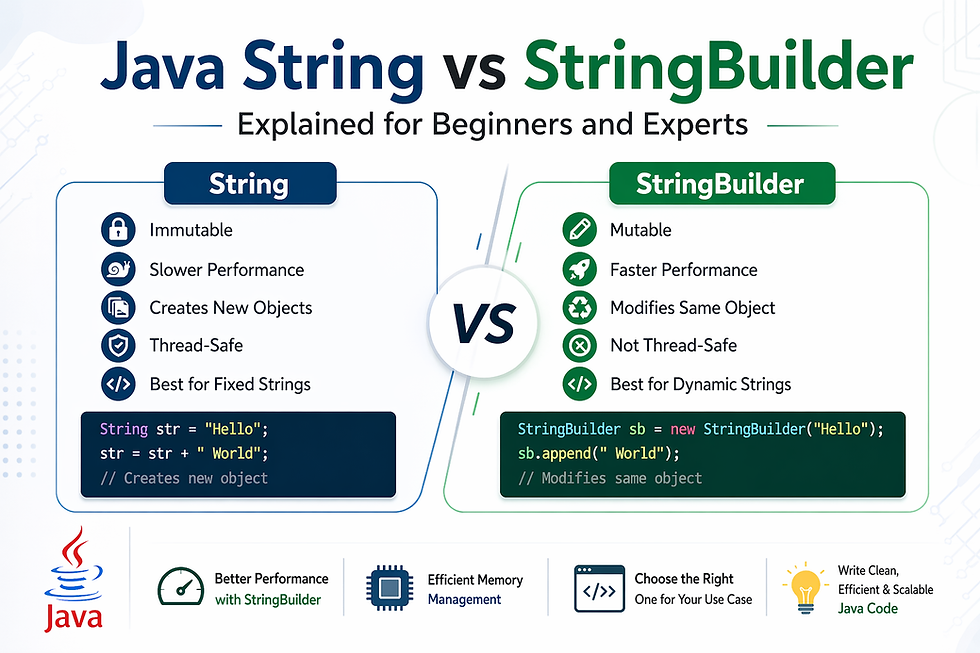
In Java, String is one of the most commonly used classes, forming the backbone of text-based operations in almost every application. Whether you're building a web app, processing data, or handling user input, strings are everywhere.
A String in Java is essentially a sequence of characters enclosed within double quotes, such as "Hello World". But what makes it unique is its immutability, meaning once a string object is created, it cannot be changed.
For example:
String message = "Hello";
message = message + " World";
At first glance, it may seem like the original string is modified. However, Java actually creates a new String object, leaving the original unchanged.
This behavior plays a critical role in performance, memory management, and thread safety—topics we’ll explore further in this guide on Java String vs StringBuilder.
What Is StringBuilder in Java?
StringBuilder is a class in Java used to create mutable sequences of characters. Unlike String, StringBuilder allows you to modify the content without creating new objects repeatedly.
It belongs to the java.lang package and is widely used when frequent string modifications are required.
Example:
StringBuilder sb = new StringBuilder("Hello");
sb.append(" World");
System.out.println(sb);
Here, instead of creating a new object, StringBuilder modifies the existing one, making it more efficient for dynamic operations.
Key characteristics of StringBuilder:
Mutable (can be changed)
Faster than String for modifications
Not thread-safe (unlike StringBuffer)
Understanding StringBuilder is crucial when comparing Java String vs StringBuilder, especially in performance-sensitive applications.
Read More: What is StringBuilder in Java?
Key Differences Between String and StringBuilder
When comparing Java String vs StringBuilder, the differences go beyond just mutability.
Feature | String | StringBuilder |
Mutability | Immutable | Mutable |
Performance | Slower for modifications | Faster for modifications |
Memory Usage | Creates multiple objects | Uses single object |
Thread Safety | Thread-safe | Not thread-safe |
Usage | Static content | Dynamic content |
In simple terms:
Use String when content doesn’t change often
Use StringBuilder when frequent updates are required
This comparison forms the foundation of understanding Java String vs StringBuilder.
Understanding String Immutability in Java
One of the most important concepts in Java is String immutability. Once a String object is created, it cannot be altered.
Example:
String str = "Java";
str.concat(" Programming");
The original str remains "Java" because a new object is created instead of modifying the existing one.
Why is String immutable?
Security: Prevents unauthorized changes
Thread Safety: Safe to use across threads
Caching: Java reuses string literals in the string pool
This immutability is a major factor in the Java String vs StringBuilder debate, especially when performance is a concern.
How StringBuilder Achieves Mutability
Unlike String, StringBuilder is mutable, meaning it can change its internal state without creating new objects.
Example:
StringBuilder sb = new StringBuilder("Java");
sb.append(" Programming");
Behind the scenes, StringBuilder uses a dynamic array to store characters. When new content is added, it updates the existing array instead of allocating new memory each time.
This makes StringBuilder:
Faster for concatenation
More memory-efficient
Ideal for loops and repeated operations
Understanding this mechanism is essential when evaluating Java String vs StringBuilder.
Performance Comparison: String vs StringBuilder
Performance is one of the biggest differentiators in Java String vs StringBuilder.
Let’s compare using a loop:
// Using String
String str = "";
for(int i = 0; i < 1000; i++) {
str += i;
}
// Using StringBuilder
StringBuilder sb = new StringBuilder();
for(int i = 0; i < 1000; i++) {
sb.append(i);
}
Result:
String creates 1000+ objects
StringBuilder modifies a single object
This leads to:
Faster execution with StringBuilder
Reduced memory overhead
Better scalability
For large-scale applications, choosing the right approach in Java String vs StringBuilder can significantly impact performance.
Memory Management and Efficiency
Memory usage is another critical factor in Java String vs StringBuilder.
With String:
Every modification creates a new object
Old objects remain in memory until garbage collected
With StringBuilder:
Only one object is used
Internal buffer expands when needed
Example:
StringBuilder sb = new StringBuilder(50);
Here, the initial capacity is set to 50 characters, reducing the need for resizing.
This makes StringBuilder:
More efficient in memory usage
Ideal for high-performance applications
Less dependent on garbage collection
Efficient memory handling is a key reason developers prefer StringBuilder in many scenarios.
When to Use String in Java
Despite its limitations, String is still widely used in Java.
Use String when:
The value is constant
Minimal modifications are required
Readability and simplicity are priorities
Examples:
Configuration values
User messages
Constants
String greeting = "Welcome to Java";
String is also preferred when thread safety is required since it is inherently safe.
Understanding when to use String is essential in mastering Java String vs StringBuilder.
When to Use StringBuilder in Java
StringBuilder is the go-to choice when performance matters.
Use StringBuilder when:
Frequent modifications are required
Working inside loops
Handling large data
Examples:
StringBuilder report = new StringBuilder();
report.append("Name: ");
report.append("John");
report.append(", Age: ");
report.append(25);
Common use cases:
Building dynamic strings
Generating reports
Processing large text data
Choosing StringBuilder in the right scenarios can greatly improve application efficiency.
String vs StringBuilder: Real-World Examples
Let’s look at practical scenarios to understand Java String vs StringBuilder better.
Example 1: Logging System
String log = "Start";
log += " -> Process";
log += " -> End";
This creates multiple objects unnecessarily.
Using StringBuilder:
StringBuilder log = new StringBuilder("Start");
log.append(" -> Process").append(" -> End");
More efficient and scalable.
Thread Safety: String vs StringBuilder vs StringBuffer
When discussing Java String vs StringBuilder, thread safety becomes an important factor—especially in multi-threaded environments.
String is inherently thread-safe because it is immutable. Multiple threads can access the same string without risk.
StringBuilder is not thread-safe, meaning concurrent modifications can lead to unexpected results.
StringBuffer is similar to StringBuilder but is synchronized, making it thread-safe (though slower).
Example:
StringBuffer sbf = new StringBuffer("Hello");
sbf.append(" World");
Quick Summary:
Use String for safety
Use StringBuilder for performance
Use StringBuffer when thread safety + mutability is required
Common Mistakes Developers Make
Even experienced developers sometimes misuse strings in Java. Here are common mistakes in Java String vs StringBuilder:
Using String inside loops for concatenation
Ignoring performance impact in large-scale applications
Choosing StringBuilder in multi-threaded environments
Not initializing StringBuilder with capacity
Example of a mistake:
String result = "";
for(int i = 0; i < 1000; i++) {
result += i; // Inefficient
}
Correct approach:
StringBuilder result = new StringBuilder();
for(int i = 0; i < 1000; i++) {
result.append(i);
}
Avoiding these mistakes can significantly improve performance.
Best Practices for Using Strings in Java
To use String effectively:
Prefer string literals for better memory usage
Avoid unnecessary concatenation
Use equals() instead of == for comparison
Keep strings immutable for safety
Example:
String str1 = "Java";
String str2 = "Java";
System.out.println(str1.equals(str2)); // true
These practices help maintain clean and efficient code while working with Java String vs StringBuilder.
Best Practices for Using StringBuilder Efficiently
To maximize performance with StringBuilder:
Initialize with proper capacity
Use method chaining (append())
Avoid converting back to String frequently
Reuse objects when possible
Example:
StringBuilder sb = new StringBuilder(100);
sb.append("Java").append(" ").append("Programming");
Following these tips ensures optimal use of StringBuilder.
StringBuilder vs StringBuffer: What’s the Difference?
Both classes are mutable, but they differ in synchronization.
Feature | StringBuilder | StringBuffer |
Thread Safety | Not thread-safe | Thread-safe |
Performance | Faster | Slower |
Use Case | Single-thread apps | Multi-thread apps |
In most modern applications, StringBuilder is preferred due to better performance unless thread safety is required.
Impact on Java Application Performance
Choosing between String and StringBuilder directly affects application performance.
Using String excessively can lead to memory overhead
StringBuilder reduces execution time
Efficient string handling improves scalability
In high-performance systems like banking, e-commerce, or real-time analytics, using StringBuilder correctly can make a noticeable difference.
Use Cases in Modern Java Development
Understanding real-world applications of Java String vs StringBuilder helps developers make better decisions.
String Use Cases:
Constants and configuration values
API responses
Fixed UI text
StringBuilder Use Cases:
Dynamic content generation
Data processing pipelines
Log file creation
Building JSON/XML responses
Modern frameworks often rely on efficient string manipulation, making this knowledge essential.
Tips to Optimize String Operations in Java
Here are expert tips to optimize performance:
Use StringBuilder for loops
Avoid unnecessary object creation
Use String.format() carefully
Prefer String pooling
Use char[] for heavy manipulation
Example optimization:
StringBuilder sb = new StringBuilder();
sb.append("Data").append(" ").append("Science");
Optimizing string operations can significantly improve application efficiency.
Read More: Java String vs StringBuilder
Conclusion:
The choice between Java String vs StringBuilder depends on your use case.
Choose String when you need simplicity, immutability, and thread safety
Choose StringBuilder when performance and frequent modifications matter
In modern Java development, a balanced understanding of both ensures:
Better performance
Cleaner code
Scalable applications
Mastering this concept is essential for both beginners and experienced developers.


Comments